
**As of 3/3/26, SecureGive will automatically record ACH returns as well as chargebacks in the All Transactions report. You do not have to manually record them. You will see returns represented by a negative entry and a purple tag of "Chargeback/Return" This process will also notify the donor that the transaction has been returned.
If you need to mark returned transaction from prior to that date you can follow the instructions here.
*Batch times for ACH transactions each day are around 8 PM Eastern Time.
*Funding/Settlement now occurs usually in 2-3 business days. *Saturday, Sunday, and Monday batches/deposits are combined for deposit.
*Because ACH transactions cannot immediately authorize funds like a card can, they are given an initial approval based upon the information being in the correct format and not being flagged for previous issues. Then that information is sent off to the donor’s bank for processing. At that point, it can be returned for a number of reasons: NSF, Account Closed or Frozen, Payment Stopped, Unable to Locate Account. ACH returns can occur anywhere from a couple of business days up to a couple of weeks. When you have an ACH return, Fortis/EpicPay will send an email notification to the signer's email listed on your ACH account . The notification comes from achcompliance@fortispay.com. Beginning 3/3/26, SecureGive will automatically mark ACH returns in your All Transactions report.
*You can also log into Fortis/EpicPay if you need to confirm deposits. If you need information about your login or need it reset, contact support@securegive.com. Fortis/EpicPay includes deposit details and will show if there was an ACH return within a deposit. (see screenshot below) There is also an ACH return/reject report that can be viewed in Fortis/EpicPay.
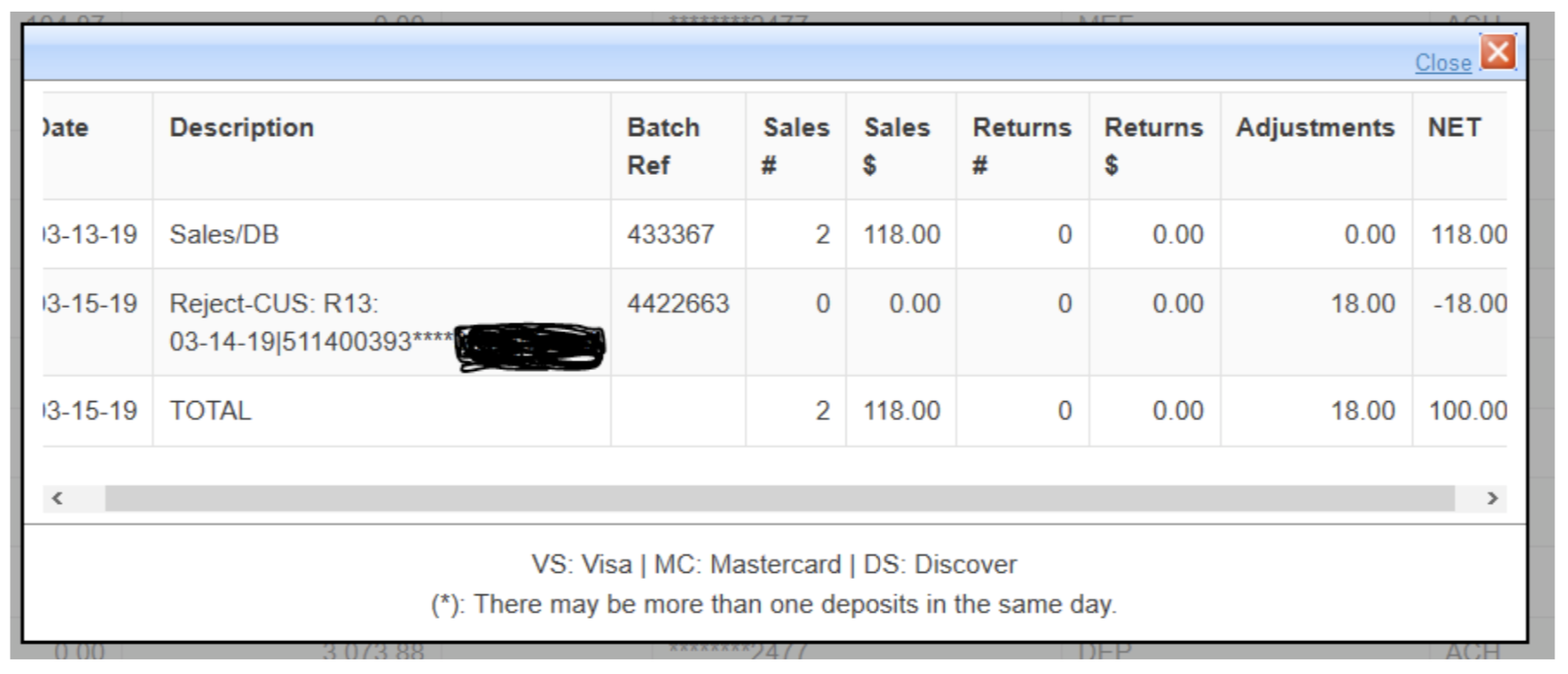
*The ACH returns will have a code on them to identify the reason for the return. We are including a reference sheet for those return codes to help you located at the bottom of this article. A Notice of Change is when the donor's bank accepts a transaction but notifies Fortis/EpicPay that something wasn't quite right with the information so they will reject it the next time if a correction isn't made. These Notices of Change will also have codes to indicate what is in error. You do not have to make an adjustment for Notices of Change in SecureGive. However, you will want to contact the donor and have them correct their payment information in SecureGive.
If you reference the ACH reject report in Fortis/EpicPay, Returns will be noted by a negative amount and an "R". Notices of Change will be zero amounts and will be noted by a "C".
Note: If refunding an ACH transaction, be sure the transaction has cleared your the donor's bank before issuing a refund. We usually recommend waiting a week for this unless the donor can show proof of it clearing their bank. *Some ACH transactions can be voided if caught the same day before the processing cutoff time. To get an ACH transaction voided, you will need to reach out to support@securegive.com or call our office: 855-895-8951.
**There is a limit to the number of ACH transactions that a donor can complete on a singular bank account each day. That limit is 3 transactions per hour and 5 per day. Also, the Fortis ACH gateway can only handle a maximum of $99,999 in one ACH transaction. Anything over that must be split up.