
SecureGive has coordinated with Shelby for a customized donation report. In order to successfully export to Shelby, the Category ID and Member ID in SecureGive must match what is assigned to your purpose codes and Member Ids in Shelby.
To input purpose codes in SecureGive: Go to Categories > Donations or Purchases. Click on the Edit Category button. Input the Shelby purpose code into the “Category ID” blank and be sure to Save. * Please note that even though your Shelby purpose code may be longer, the import process to Shelby only allows the first 5 characters with no spaces or special characters.
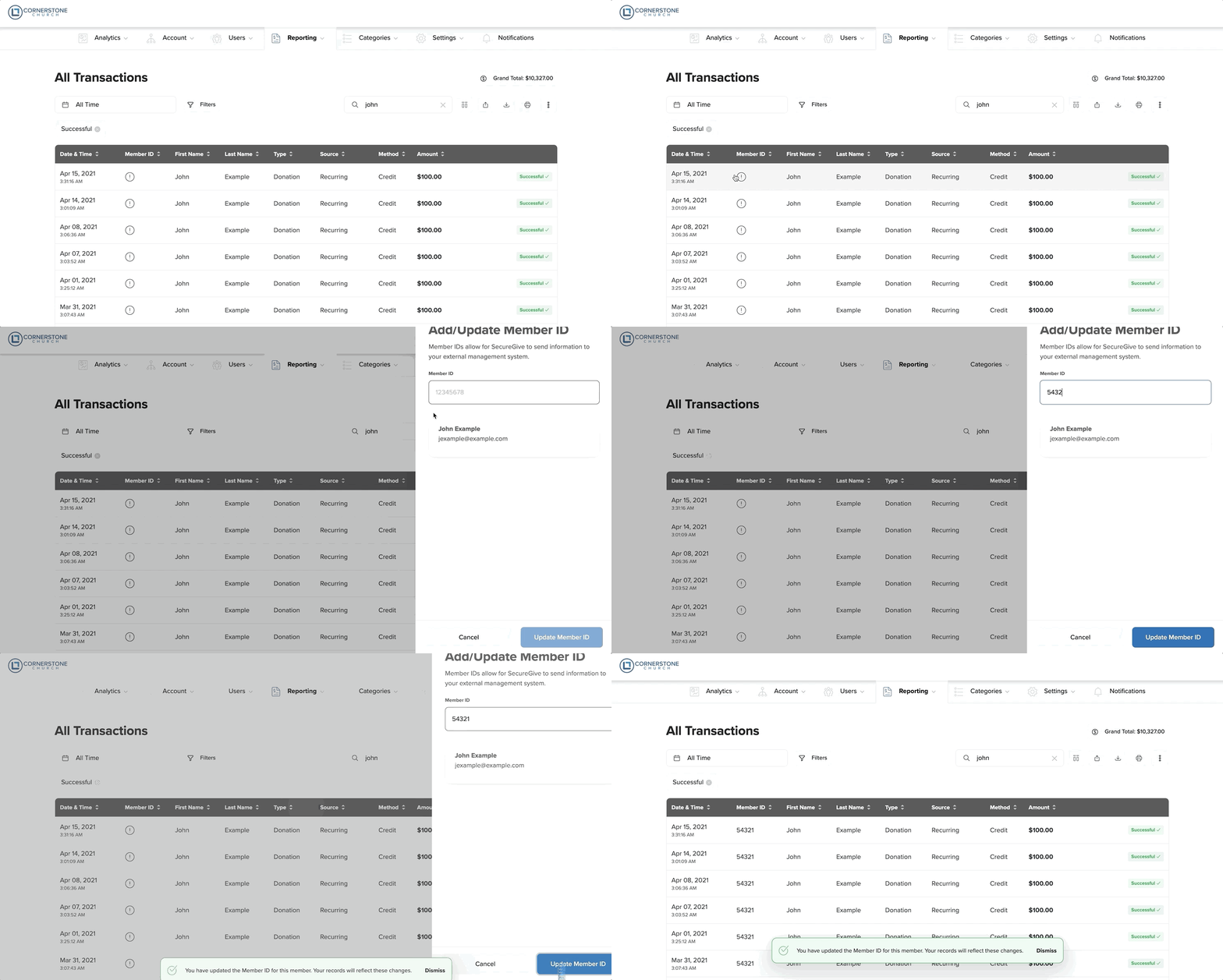
To input Member IDs: You will need to input the Shelby Member ID into the Member ID field for each member profile in SecureGive. You will only have to do this one time for each member, and it will stay connected to them for all future transactions. Do this by clicking the exclamation point in the Member ID column from the “All Transactions” page, and then enter their Member ID and choose the Update Member ID button.
You can also add a Member ID from the donor's profile by clicking the Add Member ID link, entering their Member ID, and then clicking the Update Member ID button. You can also click the Edit pencil at the top right, scroll down to the Bank One Member ID blank, and then input the Member ID there. Be sure to select Save.
With these two items in place, you can go to your “All transactions” report and refine your search on the right side of the page to choose your report dates and whatever parameters you may want. When you have done that, then click the blue download button and save the file to your Shelby Data Directory. Please do not open the file before you save it.
The next time you go into Contributions Processing in Shelby, you will be prompted that there is a file to import.
Two things to note:
- The first time you import the file from SecureGive, Shelby will ask you for a purpose code. You will need to input a purpose code to be used as a default in case any are missing when the file imports.
- You can only have one file saved in the Shelby Data Directory at one time.