If you want to make sure there are no duplicate SecureGive transaction records in your Rock RMS database, below is a SQL Script that can remove these automatically. If desired, this script could be configured to run daily/weekly/etc.. within Rock.
Retrieve the SecureGive REST User ID
To enable the script, we will need to identify the User ID that was created by Rock for the SecureGive API user. To get the correct identity for this user you will need to:
- Log into the Rock Admin Portal
- Go to Admin Tools > Power Tools > SQL Command
- Paste the text below into the SQL Text text area
-
select id
from person
where lastname like '%SecureGive REST User%'
-
- Click the Run button
- Note the value returned for the ID
Configure the Scheduled Task
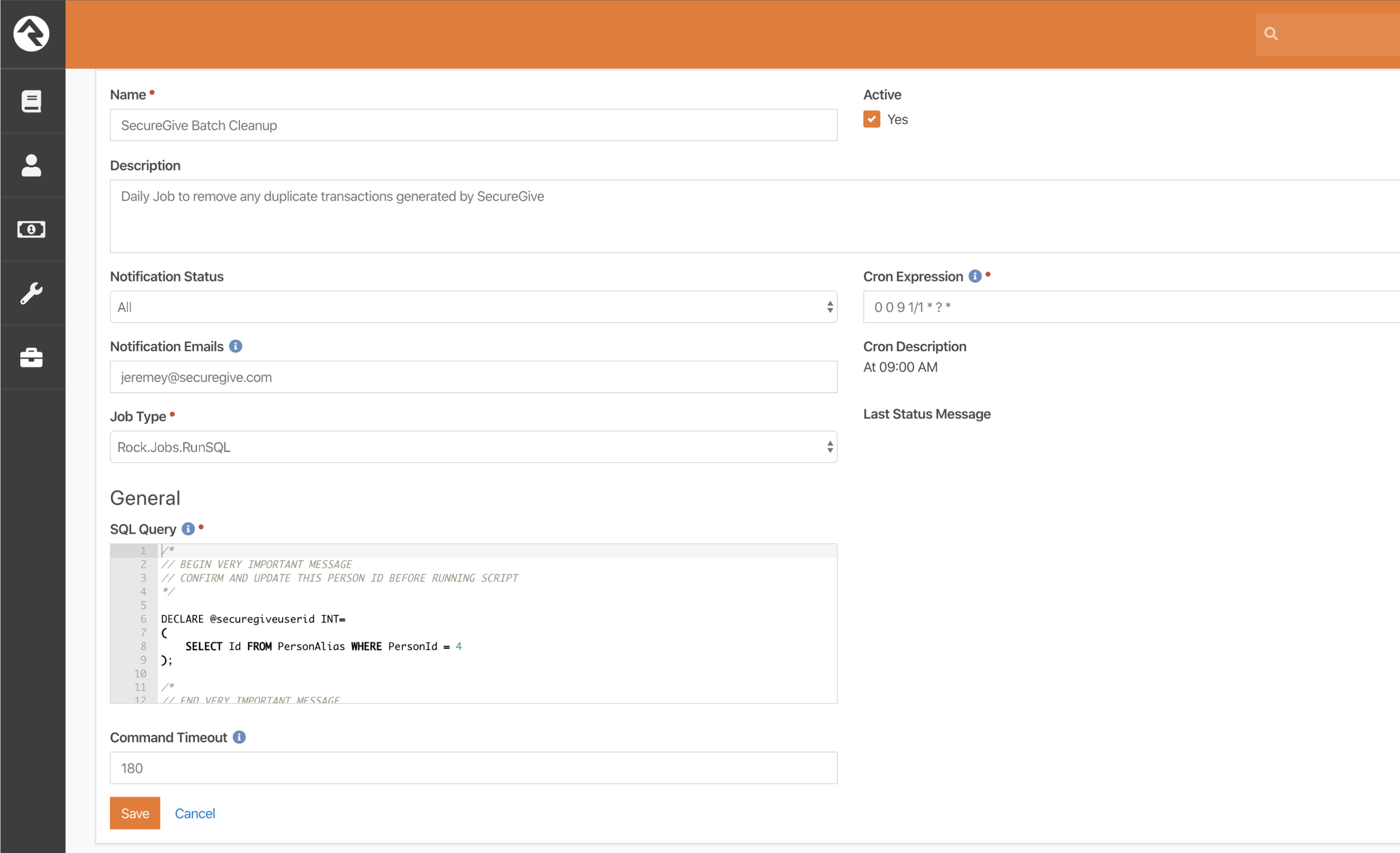
Once you have the correct ID for the SecureGive REST User, you can configure the scheduled job to cleanup duplicate transactions. To do this:
- Log into the Rock Admin Portal
- Go to Admin Tools > System Settings > Jobs Administration
- Click the Add button at the top right of the Jobs List
- In the Name field type “SecureGive Batch Cleanup”
- In the Description field put a note about the purpose of this job
- Select a Notification Status and input the notification emails in the corresponding text
boxes - In the Cron Expression field type “0 0 9 1/1 * ? *” to run the job at 9:00 AM daily
- In the Job Type select “Rock.Jobs.RunSQL”
- In the SQL Query input paste the code below
-
/*
//
// BEGIN VERY IMPORTANT MESSAGE
// CONFIRM AND UPDATE THIS PERSON ID BEFORE RUNNING SCRIPT
//
*/
DECLARE @securegiveuserid INT=
(
 SELECT Id FROM PersonAlias WHERE PersonId = 4 --Set this to the ID in the first section
);
/*
//
// END VERY IMPORTANT MESSAGE
//
*/
DECLARE @duplicateCodes TABLE
(TransactionCode VARCHAR(100),
 AccountId INT
);
DECLARE @transactionIds TABLE(TransactionId INT);
DECLARE @paymentDetailIds TABLE(PaymentDetailId INT);
DECLARE @batchIds TABLE(BatchId INT);
DECLARE @batchControlAmount TABLE
(BatchId INT,
 ControlAmount DECIMAL(18, 2),
 NewControlAmount DECIMAL(18, 2)
);
INSERT INTO @duplicateCodes
 SELECT t.TransactionCode,
 d.AccountId
 FROM FinancialTransaction t
 JOIN FinancialTransactionDetail d ON t.Id = d.TransactionId
 WHERE t.CreatedByPersonAliasId = @securegiveuserid
 AND t.TransactionCode IS NOT NULL
 AND t.TransactionCode != ''
 GROUP BY t.TransactionCode,
 d.AccountId
 HAVING COUNT(*) > 1
 ORDER BY t.TransactionCode,
 d.AccountId;
WITH cte
 AS (SELECT ROW_NUMBER() OVER(PARTITION BY t.TransactionCode,
 d.AccountId ORDER BY t.TransactionCode,
 d.AccountId,
 t.BatchId) AS rn,
 t.Id,
 t.BatchId,
 t.TransactionDateTime,
 t.TransactionCode,
 d.AccountId,
 d.Amount
 FROM FinancialTransaction t
 JOIN FinancialTransactionDetail d ON t.Id = d.TransactionId
 WHERE t.CreatedByPersonAliasId = @securegiveuserid
 AND t.TransactionCode IN
 (
 SELECT TransactionCode
 FROM @duplicateCodes
 ))
 INSERT INTO @transactionIds
 SELECT Id
 FROM cte
 WHERE rn > 1
 ORDER BY TransactionCode,
 AccountId,
 BatchId;
WITH cte
 AS (SELECT ROW_NUMBER() OVER(PARTITION BY t.TransactionCode,
 d.AccountId ORDER BY t.TransactionCode,
 d.AccountId,
 t.BatchId) AS rn,
 t.Id,
 t.BatchId,
 t.TransactionDateTime,
 t.TransactionCode,
 t.FinancialPaymentDetailId,
 d.AccountId,
 d.Amount
 FROM FinancialTransaction t
 JOIN FinancialTransactionDetail d ON t.Id = d.TransactionId
 WHERE t.CreatedByPersonAliasId = @securegiveuserid
 AND t.TransactionCode IN
 (
 SELECT TransactionCode
 FROM @duplicateCodes
 ))
 INSERT INTO @paymentDetailIds
 SELECT FinancialPaymentDetailId
 FROM cte
 WHERE rn > 1
 ORDER BY TransactionCode,
 AccountId,
 BatchId;
WITH cte
 AS (SELECT ROW_NUMBER() OVER(PARTITION BY t.TransactionCode,
 d.AccountId ORDER BY t.TransactionCode,
 d.AccountId,
 t.BatchId) AS rn,
 t.Id,
 t.BatchId,
 t.TransactionDateTime,
 t.TransactionCode,
 d.AccountId,
 d.Amount
 FROM FinancialTransaction t
 JOIN FinancialTransactionDetail d ON t.Id = d.TransactionId
 WHERE t.CreatedByPersonAliasId = @securegiveuserid
 AND t.TransactionCode IN
 (
 SELECT TransactionCode
 FROM @duplicateCodes
 ))
 INSERT INTO @batchIds
 SELECT DISTINCT
 BatchId
 FROM cte
 WHERE rn > 1;
DELETE FROM FinancialTransaction
WHERE Id IN
(
 SELECT TransactionId
 FROM @transactionIds
);
DELETE FROM FinancialTransactionDetail
WHERE TransactionId IN
(
 SELECT TransactionId
 FROM @transactionIds
);
DELETE FROM FinancialPaymentDetail
WHERE Id IN
(
 SELECT PaymentDetailId
 FROM @paymentDetailIds
);
INSERT INTO @batchControlAmount
 SELECT i.BatchId,
 b.ControlAmount,
 SUM(ISNULL(d.Amount, 0))
 FROM @batchIds i
 JOIN FinancialBatch b ON i.BatchId = b.Id
 JOIN FinancialTransaction t ON t.BatchId = b.Id
 JOIN FinancialTransactionDetail d ON t.id = d.TransactionId
 GROUP BY i.BatchId,
 b.ControlAmount;
UPDATE b
 SET
 b.ControlAmount = c.NewControlAmount
FROM @batchControlAmount c
 JOIN FinancialBatch b ON c.BatchId = b.Id;
-
- In the SQL Query input go to line 8 and replace the number 4 in WHERE PersonId = 4 with the ID that was returned in the first section. (i.e. WHERE PersonId = 53)
- Click the Save button
Here is an example: