
With each transaction, there are fees charged by the processing companies. Enabling the Offset Fees feature in SecureGive will allow your givers the opportunity to add 2.5% to their card transaction to help offset these processing fees. If you offer ACH as a payment option to your members, then the fee offset amount will be 0.5% or $1.25 based on your ACH processor. Please note that if it is being added to a donation, the additional amount is also considered a donation. However, if it is being added to a purchase, the additional amount is still considered a purchase.
To Enable:
- Go to Settings > Organization
- There are separate toggles for Donations or Purchase Fee Offsets. Enable and click SAVE
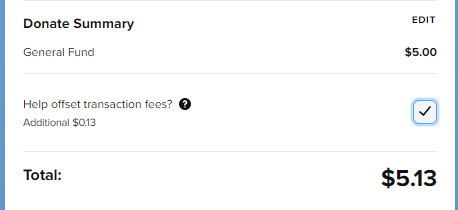
Once enabled, givers will see a box that they can check on the donation or purchase summary screen if they choose to help offset transaction fees by increasing their amount.
Export Category IDs:
If you are exporting transactions to a Donor Management System, you will need to assign IDs to the Donation and Purchase Fee Offsets so they will properly upload like your other categories. This is done from the Donation Categories or Purchase Categories page.
Fee Offset Totals:
From time to time it will be helpful to see how many of your givers have chosen to increase their transaction to help offset transaction fees. To do so, you would go to Reporting > All Transactions and click the "More Filters" button. Use the dropdown menu under Donation or Purchase Categories to choose the Offset Fee Category and be sure to hit Apply. This will filter the list down to show only those that have money going towards the Fee Offset category.